
This guide walks you through creating BigCommerce API credentials for server-side integrations such as automation platforms, custom backends, or data sync services.
Step 1: Open the BigCommerce Control Panel
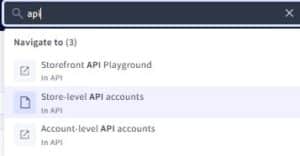
Log in to your BigCommerce store and open the Control Panel. Use the search bar in the top navigation and search for API.
Step 2: Go to Store-level API Accounts
From the search results, click Store-level API accounts. This is where you create API credentials tied to a single store
Step 3: Create a New API Account
Click Create API Account. Give the account a clear name such as Backend Integration or Automation Access.
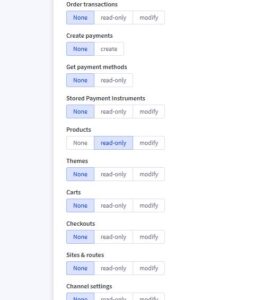
Set the OAuth Scopes as follows:
● Products: Read-only (or Modify if you need to update products)

Step 4: Save and Download Credentials
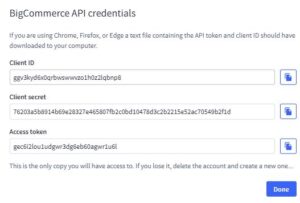
Click Save. BigCommerce will generate your API credentials. A text file may automatically download containing the credentials.
Important: Store These Securely
You will receive three values:
• Client ID
• Client Secret
• Access Token
This is the only time the Client Secret and Access Token are shown. If you lose them, you must delete the API account and create a new one.